

2·
11 hours agorun hot tap water over the lid. Not so hot you’ll shock it and crack the glass, just generally more than warm. 10 seconds, then open it.

run hot tap water over the lid. Not so hot you’ll shock it and crack the glass, just generally more than warm. 10 seconds, then open it.

2080S currently, though I’ve had others before, can’t wake up from standby with the power button or USB. On the other hand, once it’s in standby, it’ll turn itself back on after 30 minutes or so. The firmware on nvidia cards has always played badly though. I had an 8800 that I’d have to turn on several times each day before it would POST.
Standby with nvidia gpus is broken still, but everything external I’ve plugged into my system works first time.
Disable javascript

Records (LPs, anyway) really demand you listen to 20/40 minutes at a time. That can be quite useful for setting aside some time in the day, but it also requires… setting aside some time in the day.
The used CD market is an order of magnitude cheaper than vinyl.
My personal setup is amp, speakers, cd, tape, bluetooth and turntable, and to give you an idea of how valuable they are to me, I play records on it usually once every day or two, CDs or bluetooth (Bandcamp or somafm or something) a couple of times a week, and tapes less than once a month. If I didn’t sit at my computer all day for work with headphones and navidrome I’d probably listen to records a lot more though :)
If you get a new turntable, either get one with a built-in preamp and buy some good powered speakers or go the old school way (my preference) of a turntable with no pre-amp, a separate amp with a phono stage, and passive speakers. It’s generally more expandable and easier to replace individual parts when you upgrade or a capacitor explodes or something. You can get those components relatively cheap on ebay too. But basically keep the record player as simple as possible. No built-in speakers, no bluetooth, no bells and whistles. The money should go into the turntable and stylus themselves. For example I got a Fluance RT82 which I’m very happy with. Make sure you put it on a sturdy flat surface, too, not a table with spindly legs or anything. Especially not if you have a cat.
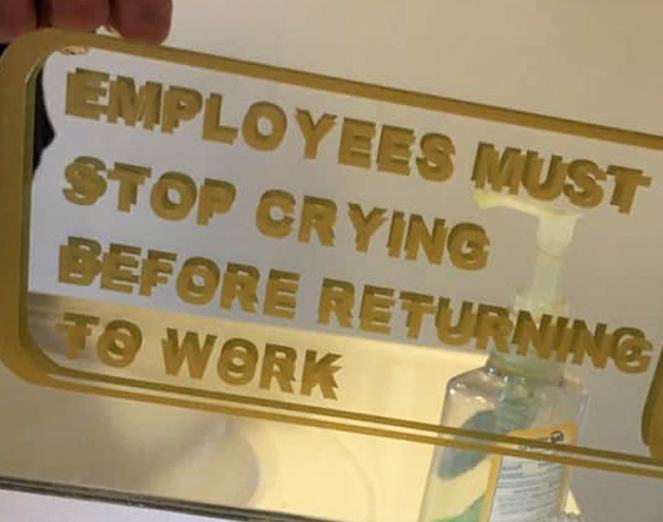
If I was on whatever that site is, it’d be a handy list of people to block.
When it’s a little less than this, my mother and grandmother would call it “curate’s tea” or “vicar’s tea” because of the white collar in the mug, and pass it back for us kids to sort it out.
oh that’s a great feature

If you’re going to run windows in a VM, then what’s the point? Why not just run one OS?
And for a while, people using tapes to make field recordings were supposed to pay more for the blanks to offset the supposed lost sales of the unrelated music industry.
GIMP had some shitty shortcuts, sure. But so did PS.
As an example of better shortcuts - you could get a rectangular selection by pressing “r”, which is an example of a very simple and straightforward UI language. You could then adjust that selection with handles without needing any chords or modifiers, zoom in with the number keys or scroll wheel, etc.
You could open a tool, like the colour picker, and switch to a different window without the app going beep and telling you “no”, which is what PS traditionally did.
You could open the app and load an image in 1/10th the time it took for PS to start which made it way nicer to use. When I was using PS I generally left it open all the time because of its sluggish start, which meant it was sitting hogging resources all day.
What I’m saying is that your personal workflow and the general UX of whatever software you’re used to using is always the thing you’re going to use as a point of comparison, and if your expected shortcut is different it doesn’t mean it’s worse.
I used PS from v3 (I think?) to CS2 (ish?) before switching to GIMP. I thought the interface was weird until a designer at my job showed me where I was getting confused. So I’ve been a semi-regular G user for the last million years and every once in a while I offer to help my partner with something in PS and honestly I take so long to get anything done because I can’t find it in the PS UI.
“Professionals” is one of those words, you know, like “consumer” or whatever, that does a lot to hide what’s really going on. I’m a professional who used to use GIMP all the time for my work. I’m not less of a professional because I didn’t like Photoshop, in fact, I used to use PS at previous jobs but gave it up because I prefer the GIMP interface (yes, I’m that person) and didn’t need the other bits. “Professional” just means you do it as a job; it doesn’t indicate what that job is, and different people have different use cases.
Pruning is a bad idea imo. Old communities here (like on reddit) can be great resources for solutions to technical problems, for example. And weird one-off communities that have like 2 memes from a decade ago can be really funny when you get linked to them.
Perhaps a notification-type nag, a tab of “communities you used to use but haven’t posted to for a while” but with a snappier title, alongside “local” and “all”.
Gotcha, thanks.
I’ve seen people mention it elsewhere in this thread. But what is MBA? I get nothing relevant when I search for it.
I didn’t know Microsoft 365 and Office 365 were different things. From the outside, it’s as opaque as Apple’s version names.


Americans (as indicated by the date format) always have such sketchy-looking power outlets.